Sunday, February 19, 2023

MiniGame2

 This minigame 2 will be a dodge minigame where the player has to avoid touching the falling objects before the timer runs out to win the game

This is just the gameplay for the game of how the game works as the tiles fall you dodge them simple.

This is the step event programming for how the tile drops straight down then destroys itself 

Difficulties: finding out how to make the walls fall straight and not fall sideways or randomly start moving around the place instead of its one way path

This is the create event programming for the bad wall with just some properties of what it will have e.g hsp and vsp.

Friday, February 3, 2023

TextBasedAdventure

 My current text for my textbasedadventure game currently in progress


https://uxbridgecollegeacuk-my.sharepoint.com/:t:/g/personal/40185484_hcuc_ac_uk/EQwqklqSsGZGv3n3GMGCdIwBqSsc8Pof94tpWHFROWg6mA


using System;
using System.Collections.Generic;
using System.Linq;
namespace textbasedgame
{
    class Program
    {
        static bool isRunning;
        static List<string> Inventory = new List<string>();


        public struct Entity
        {
            public int health;
        }


        static Entity player = new Entity();
        static Entity ogre = new Entity();


        static void _Init()
        {
            isRunning = true;


            player.health = 15;
            ogre.health = 10;
        }
        static void StartMenu()
        {
            Console.WriteLine("Welcome to the game!\n" + "Select an option:\n" + "1.Start the game \n" + "2. Exit");
            Console.Write(">");
            string choice = Console.ReadLine().ToLower();
            if (choice == "1" || choice == "start")
            {
                Room1();
            }
            else if (choice == "2" || choice == "exit")
            {
                isRunning = false;
            }
            else
            {
                Console.WriteLine("Incorrect Entry! Please press 1 or 2");
            }
        }
        static void Room1()
        {           //Room1
            Console.WriteLine("You a trapped in a dungon eliminate all enemies to get out alive");
            Console.WriteLine("1. Do you go to the right?. \n" + "2. Do you go downwards?. \n");
            Console.Write(">");
            string choice = Console.ReadLine().ToLower();
            if (choice == "1")
            {
                Room2();
            }
            else if (choice == "2")
            {
                // choice //Room 2
                Console.WriteLine("There are two doors ahead of you do you take the left or the right?");
                Console.WriteLine("1.Right. \n" + "2.Left. \n");
                string choice1 = Console.ReadLine().ToLower();
                if (choice == "1")
                {
                    // choice 2
                    Console.WriteLine("You are dead");
                    Room1();
                }
                else if (choice == "2")
                {
                    Room2();
                }
                {
                    // choice 1
                    Console.WriteLine("You Picked Correctly and are in a treasure room with a shop. \n");
                    Console.WriteLine("1.Continue on. \n" + "2. Shop for Items. \n ");


                }
            }
        }
        static void Room2()
        {       //Room3
            Console.WriteLine("There are two doors ahead of you do you take the left or the right?");
            Console.WriteLine("1.Right. \n" + "2.Left. \n");
            string choice = Console.ReadLine().ToLower();
            if (choice == "2")
            {
                // choice 1
                Console.WriteLine("You are dead");
                Room1();
            }
            else if (choice == "1")
            {
                // choice 2
                Console.WriteLine("You Picked Correctly and are in a treasure room with a shop. \n");
                Console.WriteLine("1.Continue on. \n" + "2. Shop for Items. \n ");
            }
        }
        static void Room3()
        {        //Room4
            Console.WriteLine("You Picked Correctly and are in a treasure room with a shop. \n");
            Console.WriteLine("1.Continue on. \n" + "2. Shop for Items. \n ");
            string choice = Console.ReadLine().ToLower();
            if (choice == "1")
            {
                //choice 1
                Console.WriteLine("1. Do you go to the right?. \n" + "2. Do you go downwards?. \n");
                string choice4 = Console.ReadLine().ToLower();
                if (choice == "1")
                {
                 Console.WriteLine("You have encountered . \n");


                }
            }
            else if (choice == "2")
            {
                Console.WriteLine("You have 350 gold");
                Console.WriteLine("1.upgrade sword to level 2 ($150) . \n" + "2.upgrade Bow to level 2 ($100) . \n");
                string choice5 = Console.ReadLine().ToLower();


            }
        }
        static void Main(string[] args)
        {
            _Init();
            while (isRunning == true)
            {
                StartMenu();
            }
        }
    }
}

GameJam afterpost

 My gamejam after post

https://uxbridgecollegeacuk-my.sharepoint.com/:w:/r/personal/40185484_hcuc_ac_uk/Documents/GameJam%20Afterpost.docx?d=we2a1b847bc87472cbb4f1dc96682da1a&csf=1&web=1&e=AoMq5i

This was my gamejam afterpost for my first gamejam which was my robot invasion based game


The main struggle was the animation for my player and some of the enemies in the game although I did not fix this issue I did fix many other issues like the movement as I wanted to used W A S D and not the arrow keys I also added a gun which was to kill the enemies however, I removed this as I also wanted to add many other features along side this like a player and enemy health bar with damage intake depending on the enemy therefore, I removed this to allow my to be able to send a finished product on time


MiniGame1

 My first minigame of game maker is a rope swinging game where it has a sort of spiderman swinging game where you must reach the other side without the timer running out

https://uxbridgecollegeacuk-my.sharepoint.com/:u:/r
/personal/40185484_hcuc_ac_uk/Documents/WarioWare_Engine_V005MartialG1.yyz?csf=1&web=1&e=5Z1u2o

This is the menu for the game with sort of theme going to it.
This is the map for the game with things to swing onto to get to the other side to win
This was the script for the approach command to be able to let approach become a working command with an error


This is the create event for my player with extra values for my swinging code


All of the code seen above is the step event which has how I made the swinging code work with an actual web thing that will attach to an object like a wall once the player has clicked onto the wall and the webs will disappear once clicked onto a different wall.

Thursday, February 2, 2023

Photoshop

 Photoshop butterfly 


https://uxbridgecollegeacuk-my.sharepoint.com/:i:/r/personal/40185484_hcuc_ac_uk/Documents/big-image-png-butterfly-silhouette-clip-art-2254_1976.psd?csf=1&web=1&e=OYSy1X

I used the pen tool for for this project to allow me to bend the shape to the correct size and fit for the butterfly

I also used the shapes tool to shape out the layout for my butterfly

Monday, January 30, 2023

First 2d Platformer


This is my first 2d platformer which you have to dodge traps such as bombs and spikes and make it to the next level by jumping from and to floors in which when you do make to the next level you will be faced with a harder and for difficult challenge for the player to keep them excited  


Some in game gameplay of just the animation of the player and how it runs 


This is the programming or the player like the step event and create event in which it shows the players controls such and simple movement and collision, we have also added animation to to player to make the game and player feel more accurate by jump animation, fall animation , idle animation and walking animation.


This is the programming for the bomb so how close the player has to be before the bomb start to ignite, the amount of time the player has before the bomb explodes, the distance of the bomb explosion and the animation for the bomb aswell so when it ignites it will actually start to spark the when it explodes will have an animation for that too.

The struggles I had with this was adding the collision for the spikes as it would kill the player if they were far away from it and I had as problem with the bombs as if one would count down all the other bombs would also start too however, I overcame this by just simple asking Chris and was told to make the bomb be itself so it was its own object even if more was placed around the map.


TowerDefence

 This is my TowerDefence game where you have 1 tower at the start and some cash to place a second one but enemies will start to spawn and if the towers destroys them you will earn some cash to be able to place another tower but if the enemy was to get pass all towers you will lose a live for every enemy that goes to the end checkpoint and if too many enter you will die and the game will restart.


Some in game gameplay to see how the game works with the cash enemies and towers and the arrows.


The programming of the towers and how the tower shoots the arrows with its delay also the placement of the towers so where you can place them and how often you are able to place the towers with your cash.


The programming of the enemies about where they are allowed to go, the speed of them, the amount of how many can spawn in am certain time and the money you earn from killing them with the amount of cash you earn from each kill.


DeathLoop

 DeathLoop is my gamesjam project which has a simple and easy menu as my game is a text based horror game which you have to loop around reading notes to solve a suicide to find out at the end you the player took you own live due to a haunted house trying to possesses you 


The programming for the notes which shows the step event create event and draw event also shows how there is a different piece of text in every room which I found on the internet and Chris.


This is the text box which is where all the text goes how it is layered
and how the player can interact with the text to activate the speech so you can sort of flip over the note so the player can read two parts of text and the text box has a delay so you are unable to spam the text meaning you have to walk back from the text to be able to read it if you has read it once before.


L3 Menu Project

 This is my gamemaker menu which has a working start button in which if you click start it will take you to a separate room to be that start room same applies with the settings button

There is also the programming shown bellow to show the text box colour position 


Minigame Layout

 This is how our mini game layout should look for example having a countdown timer for every minigame you make to make it more difficult and have text for which game to pick and text if you win or lose


Spaceship Shooter


Spaceship Shooter is a spaceship shooter in which you have to shoot enemy ships that will try to shoot and ram you to eliminate you the game also has a simple space background. 

There is also some programming shown for my Player for the create event and step event. 


3D Maya Themed Diorama

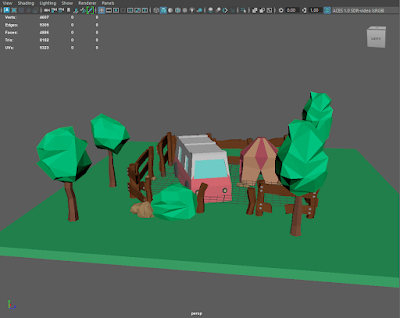
This is my themed diorama work I did a campsite kind of thing with a caravan, a tent, bushes, rocks, trees and fences. I wanted to this mode...